AI Gold Trading Engines Explained: How Auspex Desk Works
A guided tour of Auspex Desk: the live gold price, your dashboard, open positions with stop and target, Telegram alerts, and how to read every engine's published paper trading record.
Auspex Desk 10 min read
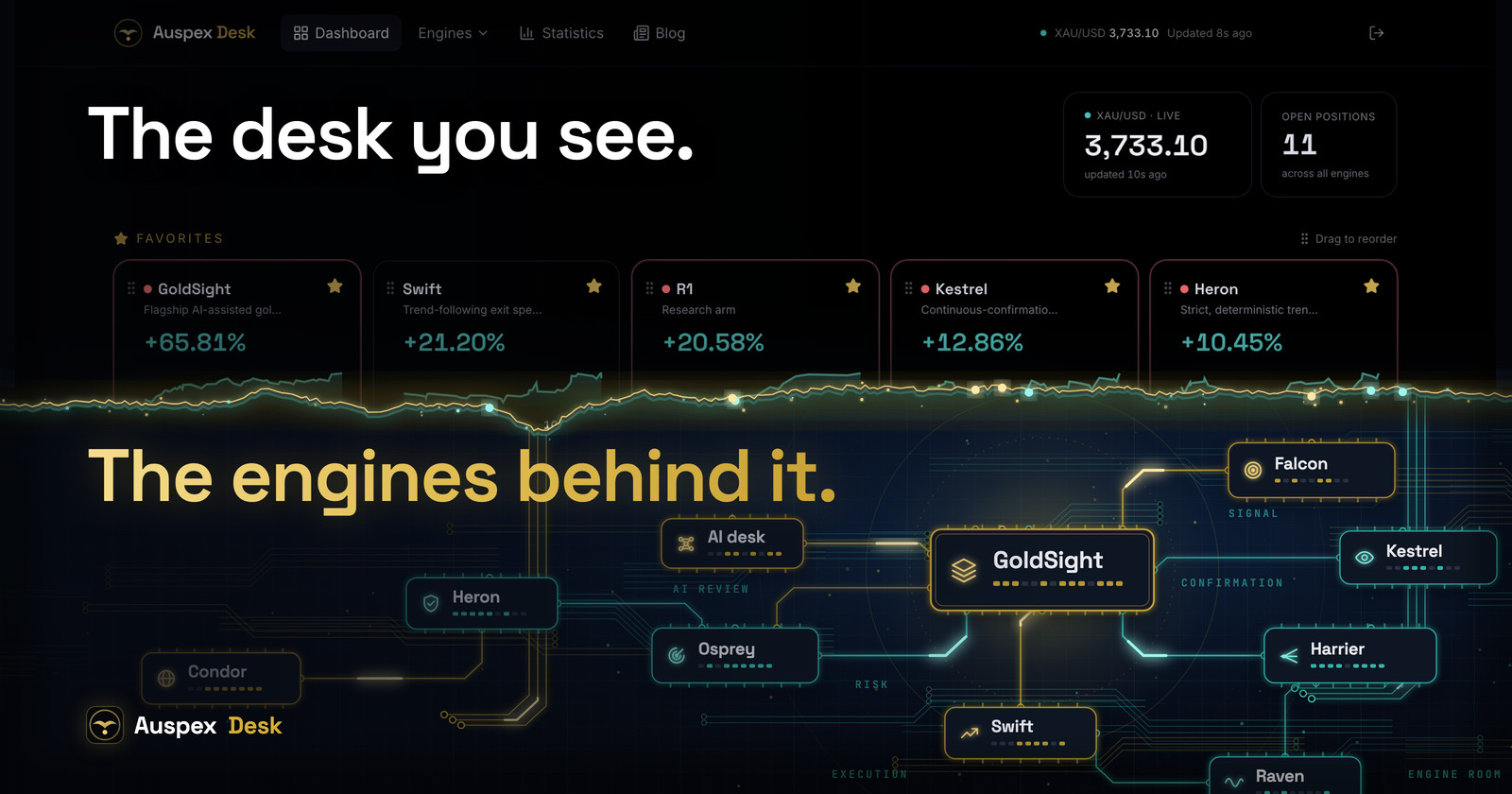
Auspex Desk is a desk of independent trading engines on gold (XAU/USD), plus one beta engine on USD/JPY. Some are AI-led, some are strictly rule-based, and each trades its own simulated paper account against live market prices. Every trade is published: entry, stop, target, exit and result, wins and losses alike.
If you are new to AI gold trading, think of it as a trading floor with glass walls. The engines' rules stay private, but you can watch every decision they make and check the full paper trading track record behind each one. This guide walks you through the platform screen by screen.
What Auspex Desk is, and what it is not
Each engine is named after a bird: GoldSight, Falcon, Heron, Kestrel, Osprey, Harrier and more. They share one market and one live price feed, yet they think differently. The flagship, GoldSight, combines proprietary scoring with the desk's proprietary AI, trained on 10+ years of market data and 1,000+ day-trading books and research papers. Others are deliberately mechanical, so AI judgment and pure rules can be compared on the same market, trade by trade.
All results are simulated: no engine trades real money, and nothing here is a recommendation to buy or sell. Think of it as an open laboratory of automated gold trading, with the evidence in plain view.
Where to see the live gold price
Once you sign in, the live gold price is never more than a glance away. The header shows XAU/USD on every page with an "updated" timer, and the dashboard opens with a larger XAU/USD live card next to the number of open positions across all engines. The price refreshes continuously, typically within seconds, and the same feed drives every open P/L figure on the engine pages.
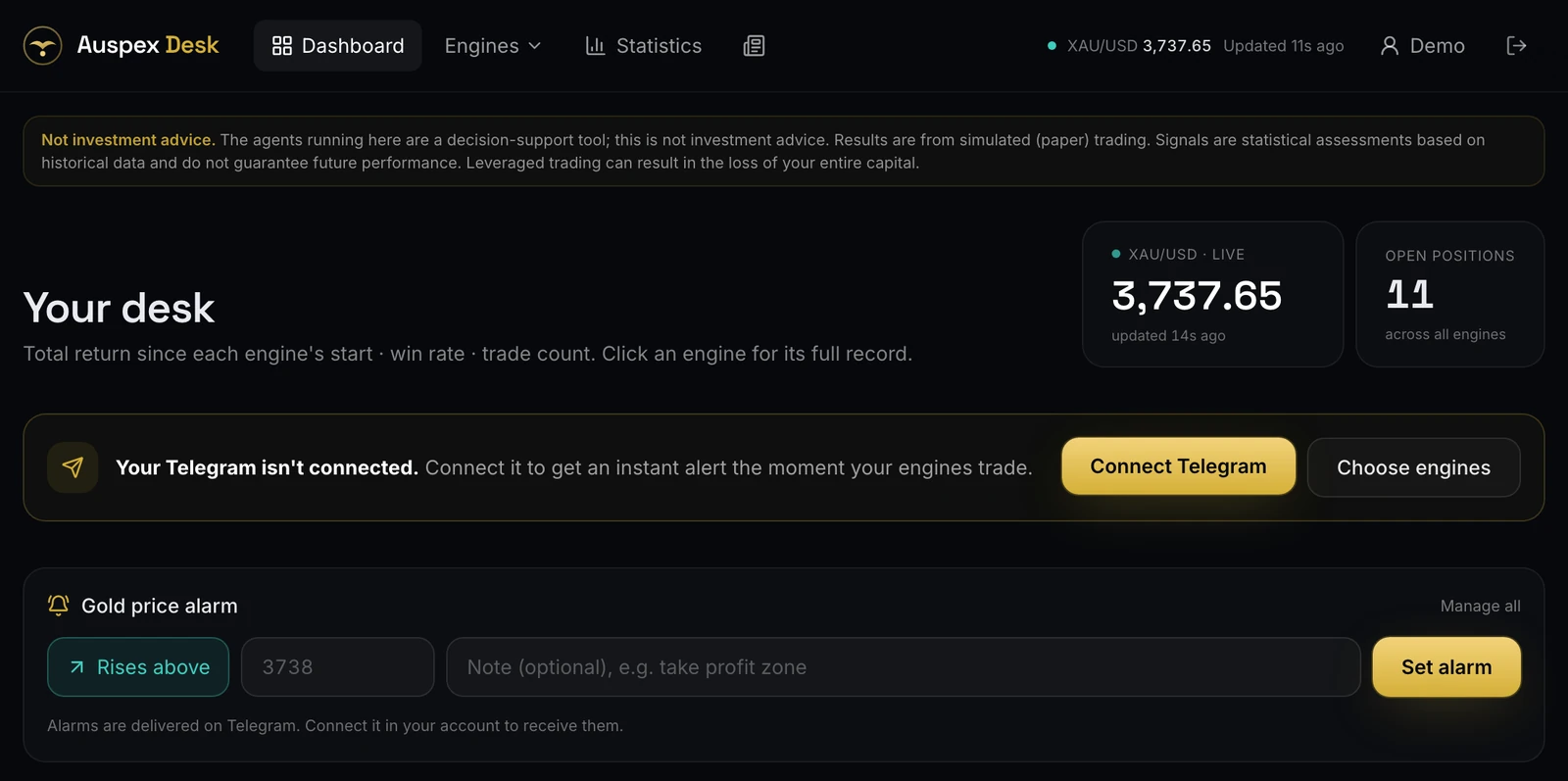
Just below sits a quick gold price alarm: pick "rises above" or "falls below", enter a level and add an optional note. Alarms arrive on Telegram.
Your dashboard
The dashboard is your desk at a glance. Every engine has a card with its total return since its start, an equity sparkline, its win rate and its trade count, grouped into gold engines, research arms and currency engines. A colored dot shows when an engine is in a trade: red for an open sell, green for an open buy.
Tap the star on any card to pin it to Favorites, then drag your favorites into your own order.
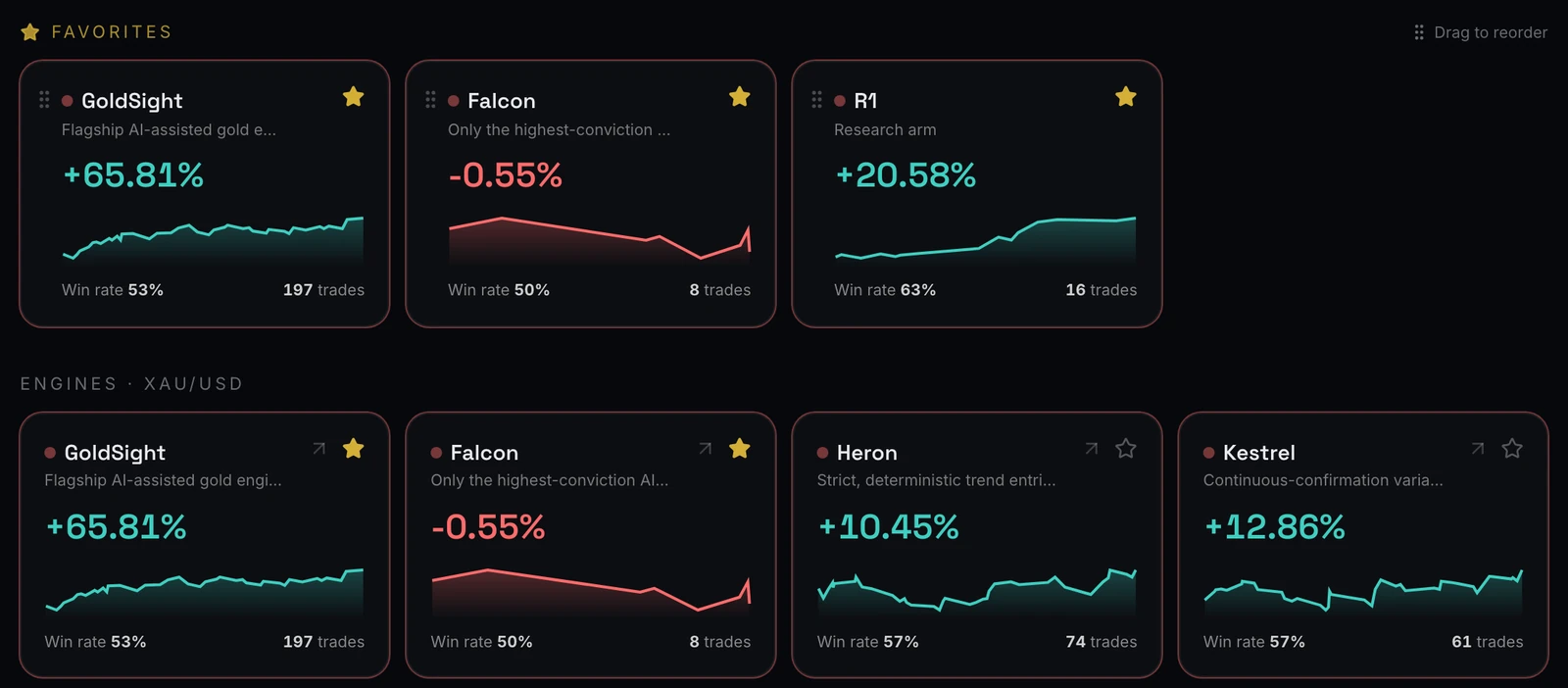
Following an open position: entry, live price, stop and target
Click any engine to open its page. Each XAU/USD trading engine page starts with the headline numbers: live Equity (realized results plus the open position at the live price), total return, win rate, profit factor and maximum drawdown. Below them is the open position card, the heart of the page whenever the engine is in a trade.
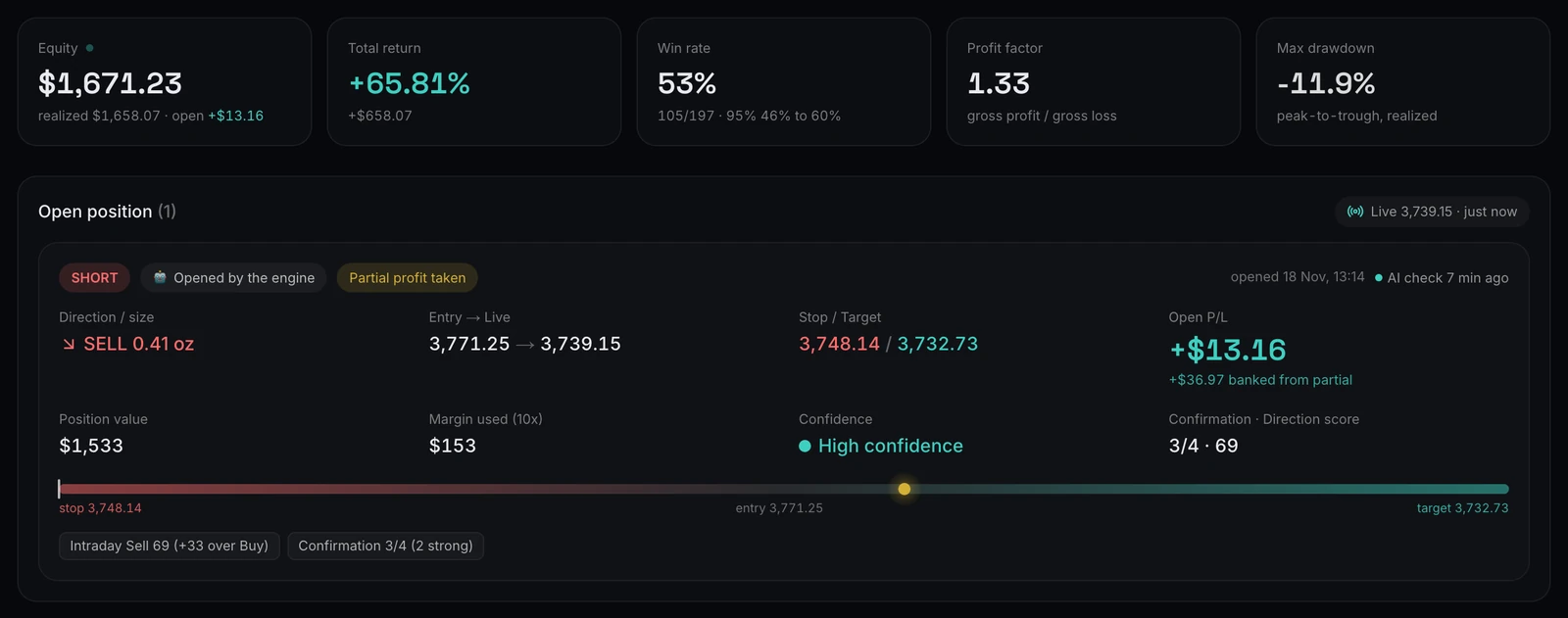
How to read the card:
- Direction and size: buy (long) or sell (short), and the size in ounces of gold.
- Entry → Live: the fill price next to the current XAU/USD price.
- Stop / Target: together, stop loss and take profit define the trade's plan: where it gives up and what it aims for.
- Open P/L: the unrealized result at the live price. Profit already banked from a partial close is shown separately underneath.
- Position value and margin used: what the position is worth, and the margin it ties up in a 10x account.
- Source and confidence: whether the AI or the engine's rules opened the trade, and the confidence level attached to it.
The bar along the bottom is the stop to target track: stop on the left, target on the right, a tick for the entry and a glowing dot for the live price. One glance tells you whether the trade is closer to its stop or its target. In the example above, the stop has already moved past the entry price, so the rest of the position is protected even if gold turns.
Partial take profit and stop management
Many engines do not simply wait for the stop or the target. Once a trade has moved far enough in its favor, an engine can take partial profit: it closes part of the position, banks that gain and lets the rest run. It can then move the stop to protect what is left, first toward the entry price and later behind the move as a trailing stop.
Each engine decides when to act with its own rules, and those levels stay private. Every step is public, though: the activity log on the engine page records each event as it happens.
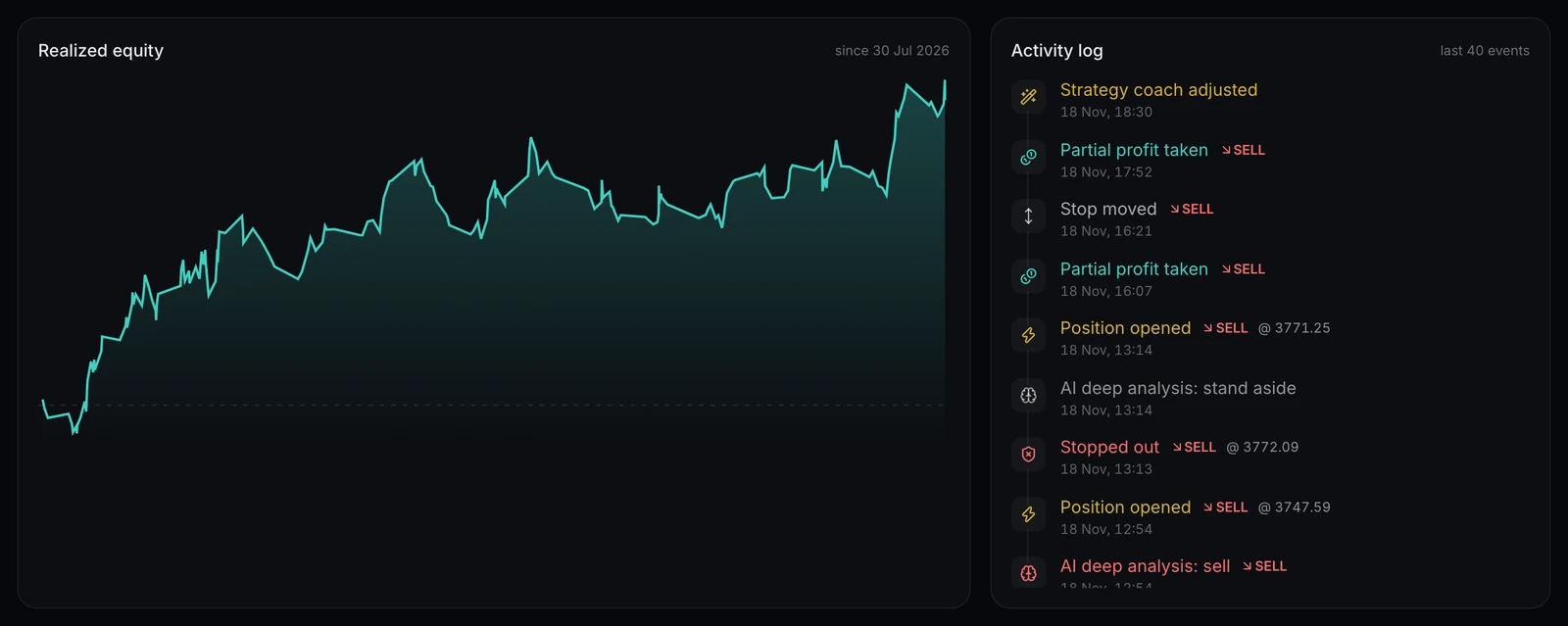
A banked partial profit counts in the engine's equity straight away, while the rest of the position is still open. When the remainder closes, the whole trade appears as a single row in the trade history with its combined result, so nothing is counted twice.
Leverage and position size explained
Every engine trades a simulated account with 10x leverage, which means a position only ties up a fraction of its value as margin:
Margin used = position value ÷ leverage
An example with round numbers: gold trades at $4,000 an ounce and an engine buys 0.40 oz. The position value is 0.40 × $4,000 = $1,600, so at 10x the margin used is $160. Every $1 move in gold changes the result by $0.40, so a $10 move is worth $4, up or down.
Leverage does not change what a move earns or loses per ounce; it changes how much margin a position needs, which is why position size matters so much. Each engine sets its size with its own risk model, so sizes differ from trade to trade and from engine to engine. On GoldSight, the AI reviewing an entry can reduce its size but never enlarge it.
Telegram alerts: how to switch them on and what you receive
Telegram trading alerts are the easiest way to follow the desk without keeping a tab open. Unlike anonymous trading signals, every alert comes from an engine whose complete record is public. Setup takes a minute:
- Go to Account and press Connect Telegram. This opens the Auspex Desk bot with a one-time link.
- Start the bot. Your connection then waits for a quick approval by the desk ("Waiting for approval").
- Tick the engines you want alerts from and save your choices.
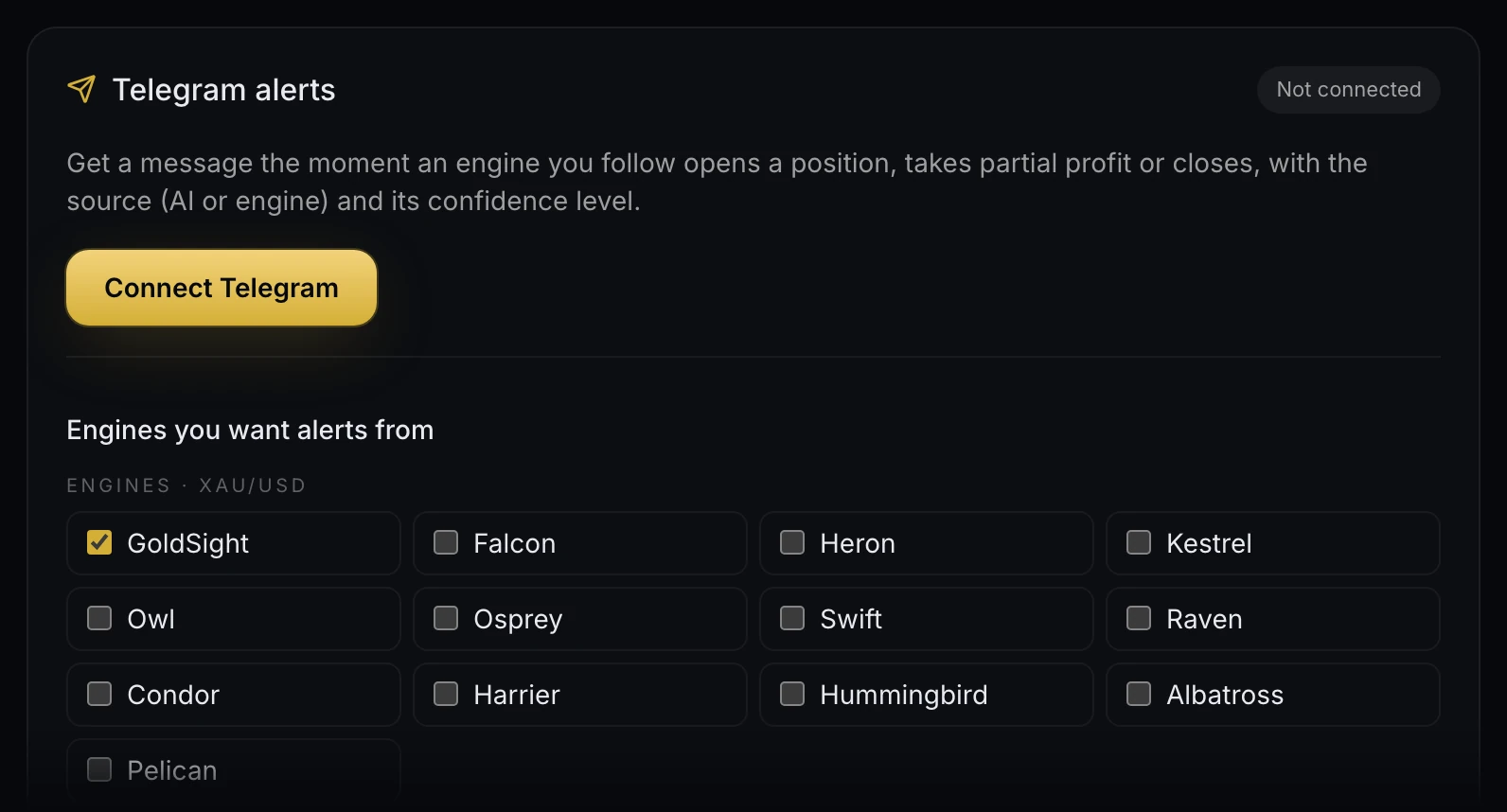
You can also switch alerts on or off for a single engine with the Telegram alerts switch at the top of its page.

What an alert contains
When an engine you follow opens a trade, the message gives you the engine and the side (BUY or SELL), the entry, stop and target, the position size, the source (AI or engine) with its confidence level, a short rationale line such as the live score behind the entry, and the time in your own time zone.
Follow-up messages arrive when the engine takes partial profit, with the amount banked, and when it closes, with the exit price, the result in dollars and in R, and how it ended: target hit, stop loss, trailing stop, end of day or closed by the desk.
Price alarms and bot commands
Price alarms are personal. Set a level on the dashboard, on your account page or from the bot, add a note, and each alarm fires once when gold crosses it. Only you receive your alarms. The bot also answers commands:
/positions: open positions of the engines you follow, with live P/L;/status: the price and your engines at a glance;/pnl: total return, win rate and the last 7 days;/price: gold (and USD/JPY) right now.
Add all to see every engine, as in /positions all, and send /help for the full list.
What the engines are
The desk has three families, each explained in plain language on the strategies page:
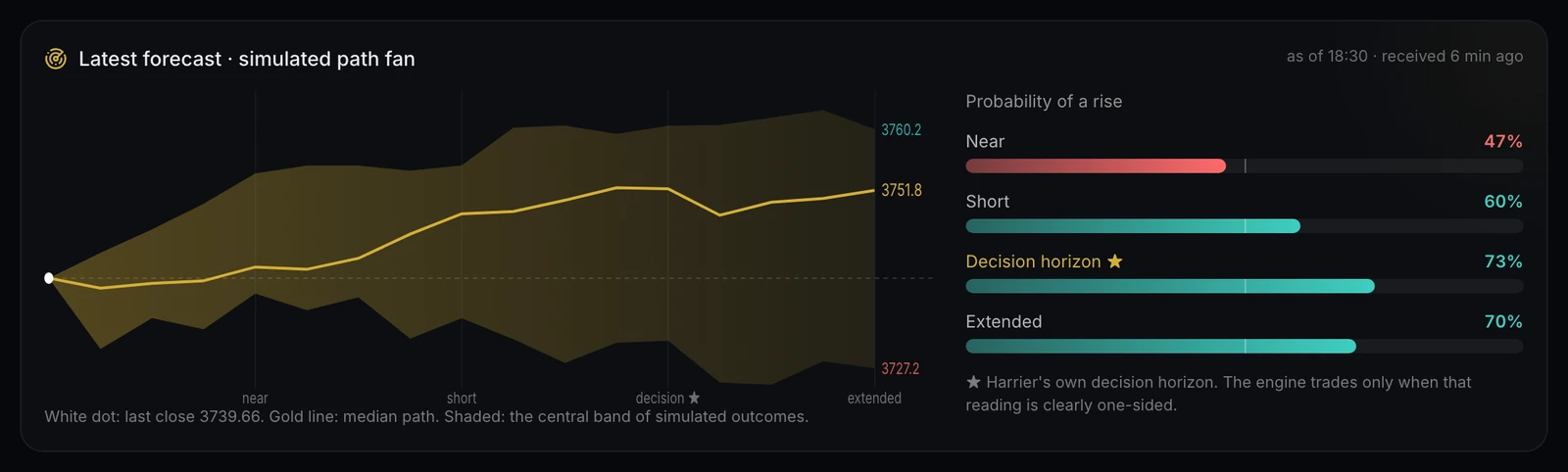
- Gold engines. Autonomous engines on spot gold, AI-led and rule-based, each with its own playbook and account. GoldSight is the flagship: proprietary multi-timeframe scoring, a confirmation check with veto power and an AI desk on top. Falcon runs the same AI chain but trades only when the AI's confidence comes out high. Heron removes every discretionary layer and trades fixed rules, while Harrier reads gold through a candlestick foundation model that projects a fan of possible price paths.
- Research arms. R1 to R17 are pre-registered research strategies running live side by side, judged against criteria fixed before their first trade.
- Currency engine. Crane applies GoldSight's discipline to USD/JPY and is in beta.
Engines never share positions or accounts. When two of them disagree, both trades are published, so you can see which approach holds up on the same market.
Reading the statistics
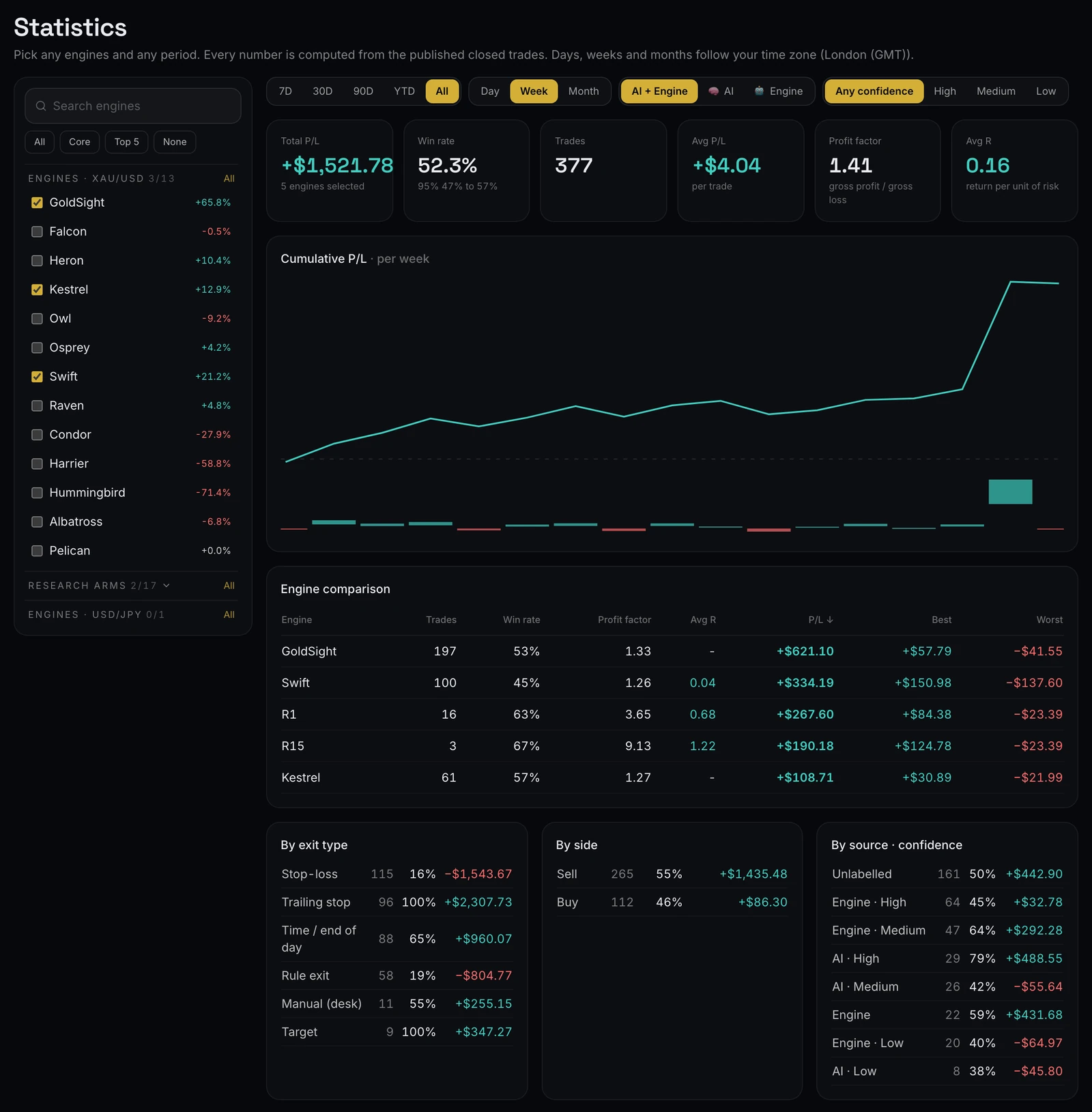
Every engine page includes performance analytics built from its closed trades, and the Statistics page combines any engines over any period. The numbers that matter most:
- Win rate with its 95% range. The share of winning trades, with a 95% confidence range beside it. A short record gives a wide range; it narrows as trades accumulate.
- Profit factor. Gross profit divided by gross loss. Above 1, winners have outweighed losers in dollars.
- Max drawdown. The deepest peak-to-trough fall of the realized equity curve: the worst stretch an engine has been through.
- Monthly P/L. Profit and loss per calendar month in your time zone, with trade count and win rate under each bar.
- R distribution. Results in units of risk, where 1R is the planned loss at the stop. It shows whether an engine wins through many small gains or a few large ones.
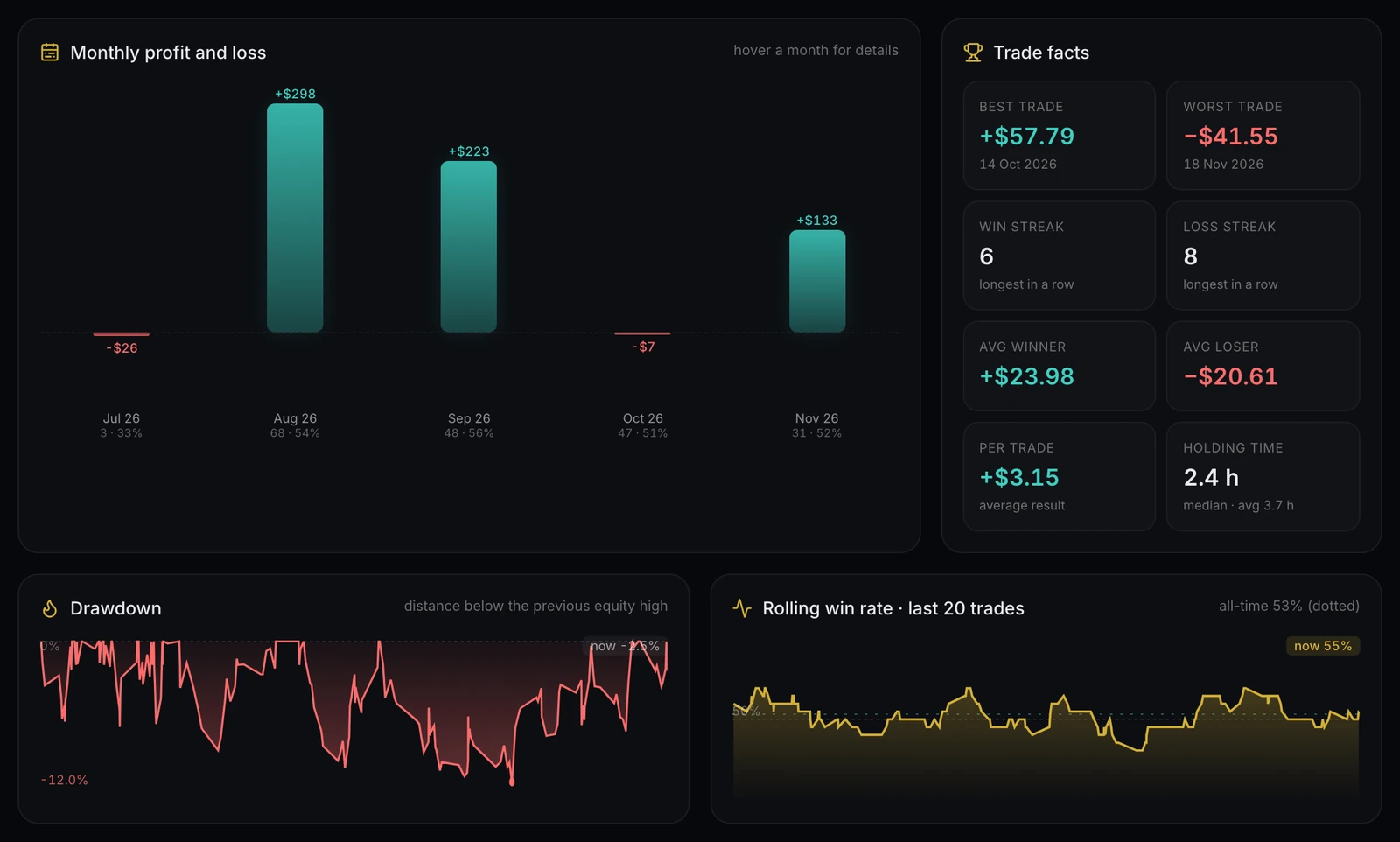
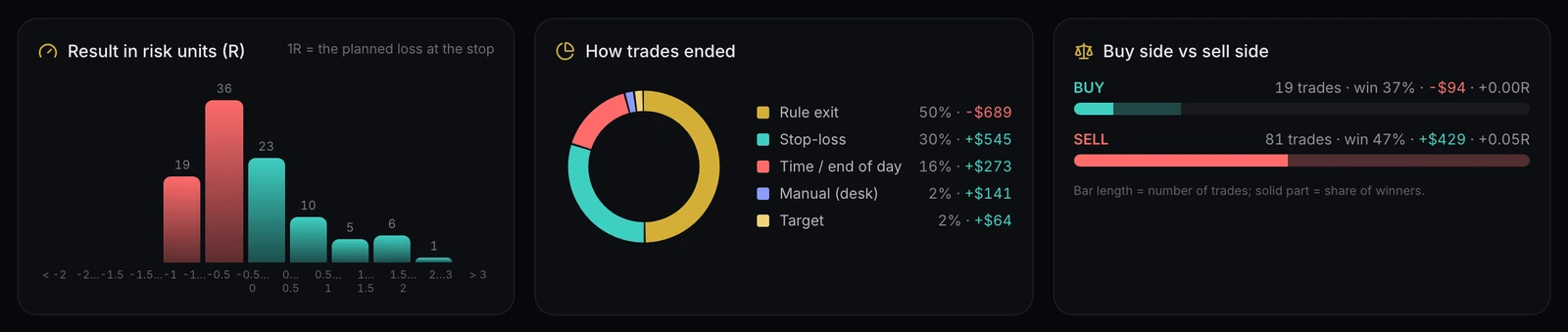
On the Statistics page, pick engines (or a preset such as Top 5), a period from the last 7 days to all time, a grouping by day, week or month, and filter by source and confidence. You get total P/L, win rate, average P/L, profit factor, average R, a cumulative P/L chart, an engine comparison table and breakdowns by exit type, side and source.
Trade history
At the bottom of every engine page is the complete trade history, newest first: trade number, open and close times, side, source and confidence, size, entry, stop, target and exit prices, the result in dollars (and in R where the engine defines one) and the exit type.
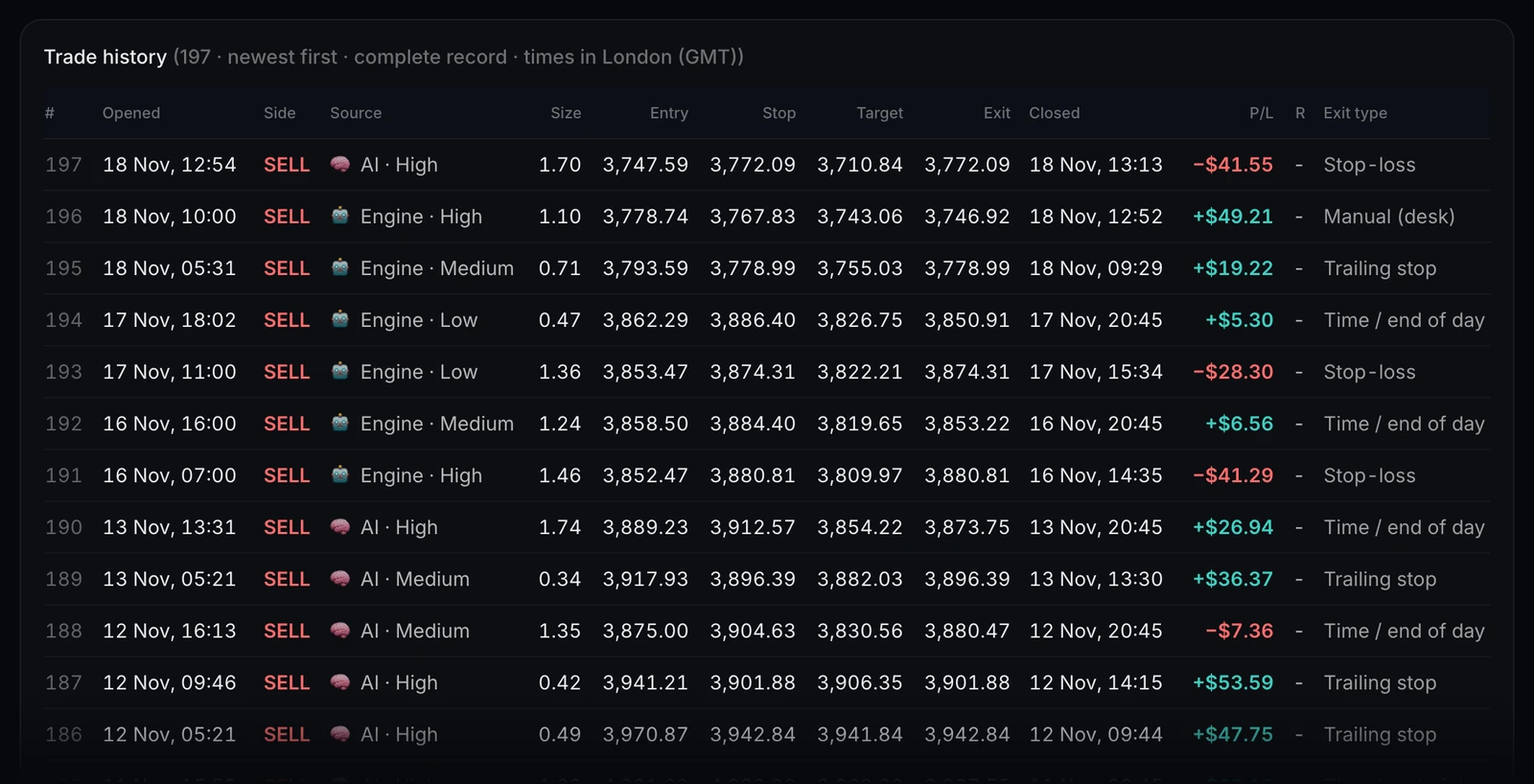
All times follow your own time zone, detected from your browser and adjustable on your account page. When the desk closes a trade by hand, it is never hidden: it is marked "Manual (desk)", and a note under the table gives the count and combined result, because those trades count toward every number like any other.
Live desk panels
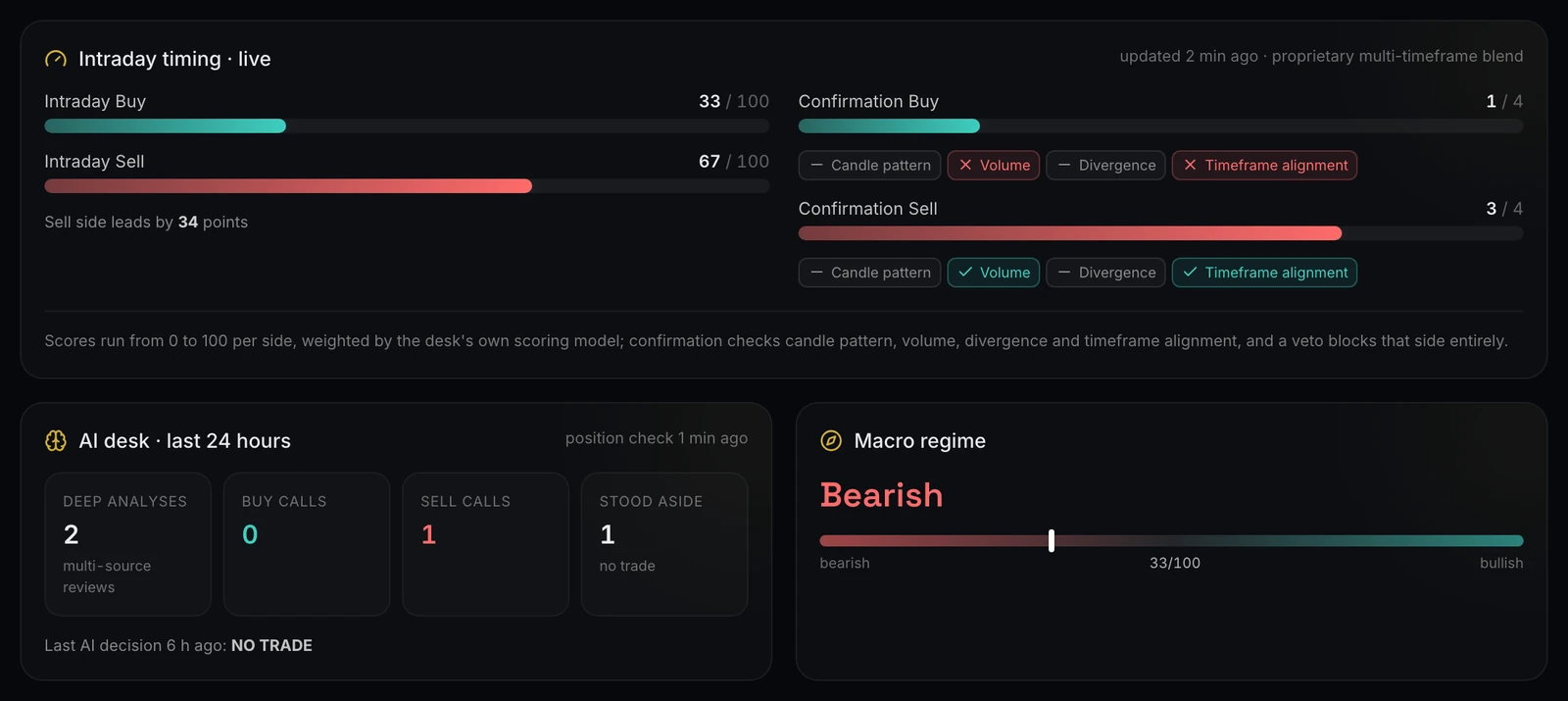
Above the analytics, each engine has a Live desk section showing what it is looking at right now, refreshed continuously. GoldSight's panel shows its intraday buy and sell scores, the confirmation checks behind each side (candle pattern, volume, divergence and timeframe alignment), the AI desk's recent activity and the macro regime.
Harrier's panel is a forecast fan: a median path inside a band of simulated price paths, the probability of a rise at several horizons, and a calibration chart that scores past forecasts against what actually happened.
Other engines show their own views. None reveal the rules, but all show the engine's current read of the market, so a trade never comes out of nowhere.
Frequently asked questions
Is Auspex Desk a gold trading bot I can connect to my broker?
No. Auspex Desk publishes simulated paper trading from its own engines; it does not connect to brokers or place trades for you. What you do with the information is your own decision.
Are the results real?
The trades are simulated against live market prices with realistic trading costs, and every one is published, losses included. No real money is at risk on our side.
Can I see the rules behind each engine?
No. Rules, parameters and AI instructions are the desk's edge and stay private. Every result is public instead, so you can judge each engine on its record.
How fast are Telegram alerts?
Alerts go out as the desk records each event, typically within seconds of a trade opening, taking partial profit or closing.
Is it free?
Yes. During early access every signed-up member can see live positions and use Telegram alerts and price alarms.
Start following the desk
The quickest way to understand AI gold trading on Auspex Desk is to watch it live. Create a free account, star a few engines, connect Telegram and follow the next trade from entry to exit. Browse the strategies to choose your engines, and visit the desk blog for engine reviews and research notes.
Simulated paper trading. Not investment advice.
Weekly desk notes
New articles and engine reviews in your inbox, once a week.
Discussion (0)
No comments yet. Start the discussion.